- Why Productivity Matters
- Productivity Killers
- Sequential Order Navigation
- Process Orders in Batches
- Create a Clear Order Workflow
- Reduce Back-and-Forth Navigation
- Use Smart Filters
- Minimize Admin Load Time
- Use the Right Admin Tools
- Before vs After Optimization
- How Large Stores Stay Productive
- Admin UX and Growth
- Small Improvements That Add Up
- Improve Your Workflow Today
- When to Upgrade Your Workflow
- Final Thoughts
Running a WooCommerce store is exciting—until your backend starts slowing you down.
At the beginning, managing products and orders feels simple. But as your store grows, something changes:
- Orders pile up
- Admin tasks multiply
- Simple actions take longer
Suddenly, you're spending hours inside the WooCommerce dashboard just trying to keep up.
Most store owners focus on marketing and sales—but ignore admin productivity, which directly affects fulfillment speed, customer satisfaction, team efficiency, and overall profitability.
In this guide, you'll learn practical WooCommerce admin productivity tips that can help you:
- Process orders faster
- Reduce manual work
- Improve workflow efficiency
- Save hours every week
Let's get into it.
Why WooCommerce Admin Productivity Matters More Than You Think
Most WooCommerce stores don't fail because of lack of traffic.
They struggle because of operational inefficiency.
Think about this:
If you process 50 orders per day and waste just 30 seconds per order, that's:
50 orders × 30 seconds = 25 minutes per day
That's over 12 hours per month wasted.
Now imagine at 200 orders per day.
Admin inefficiencies scale fast.
The Biggest Productivity Killers in WooCommerce
Before fixing productivity, you need to understand what's slowing you down.
1. Poor Order Navigation
You open an order → go back → lose your place → scroll again.
This is one of the biggest hidden time-wasters.
2. Too Many Clicks
Simple actions require:
- opening pages
- loading screens
- navigating back
Each click adds friction.
3. Manual Repetition
Repeating tasks like:
- updating orders
- checking details
- switching screens
This kills productivity.
4. No Workflow Structure
Most stores don't have a defined order-processing workflow.
Everything feels random and reactive.
7 WooCommerce Admin Productivity Tips That Actually Work
Let's fix these problems with actionable strategies.
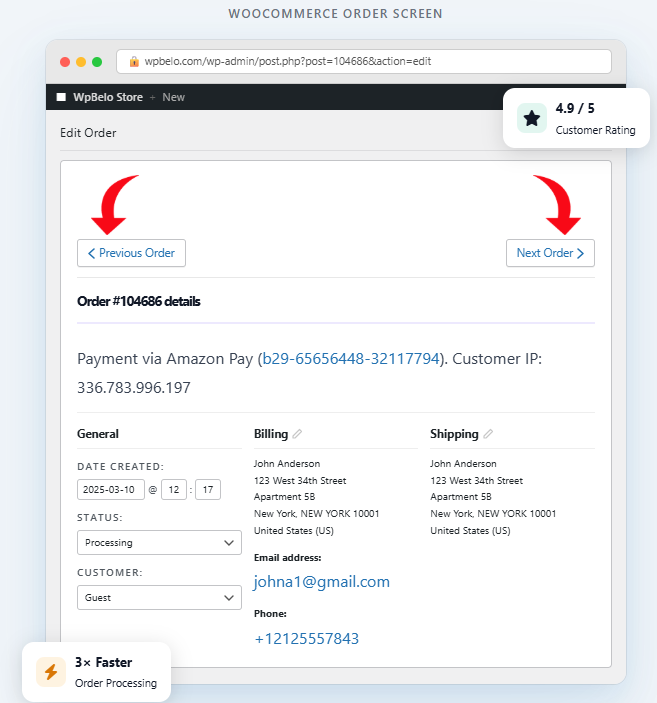
1️⃣ Use Sequential Order Navigation (Game Changer)
Best for Speed & Navigation
This is the most impactful improvement you can make immediately.
By default, WooCommerce forces you to:
Open order → Go back → Find next order
Instead, you should be able to:
Open order → Click Next → Continue
That's exactly what WooFlow Previous Next Order Navigation does.
Why this matters:
- eliminates unnecessary clicks
- keeps your workflow continuous
- removes mental load
For stores processing many orders, this alone can cut processing time significantly.
Key Features
- Previous/Next order navigation buttons
- Seamless workflow integration
- Zero configuration required
- Works with all WooCommerce themes
2️⃣ Process Orders in Batches
Instead of handling orders randomly, group them.
Examples:
- process all "processing" orders first
- handle refunds in one session
- review high-value orders separately
Why it works: Batching reduces context switching. Your brain stays focused on one type of task.
3️⃣ Create a Clear Order Workflow
High-performing stores follow a consistent process.
Example workflow:
New Order → Review → Payment Check → Fulfillment → Completed
Define:
- what happens at each stage
- who is responsible
- what tools are used
This reduces confusion and speeds up execution.
4️⃣ Reduce Back-and-Forth Navigation
Switching between pages is a major productivity killer.
Instead:
- stay within the order view
- avoid returning to lists unnecessarily
- move forward, not backward
Again, this is where tools like WooFlow Previous Next Order Navigation shine.
5️⃣ Use Smart Filters in Orders Page
WooCommerce allows filtering by:
- status
- date
- customer
- product
Use filters to narrow your focus.
Example:
Show only "Processing" orders
Now you're working on a targeted list, not everything.
6️⃣ Minimize Admin Load Time
Slow dashboards destroy productivity.
Common causes:
- too many plugins
- heavy themes
- unoptimized database
Quick fixes:
- remove unused plugins
- use caching
- optimize images
- clean database
Even a 1-second improvement in load time saves hours monthly.
7️⃣ Use the Right Admin Tools
The right tools can multiply your efficiency.
Look for tools that:
- reduce clicks
- automate repetitive tasks
- improve navigation
One simple but powerful example is WooFlow Previous Next Order Navigation, which focuses purely on navigation efficiency.
Real Example: Before vs After Optimization
Let's compare workflows.
Without Optimization
Open order
Process order
Back to list
Scroll
Find next
Open order
Time per order: ~20–40 seconds overhead
With Optimized Workflow
Open order
Process order
Click Next
Continue
Time per order: minimal overhead
Multiply that across 100+ orders.
The difference becomes massive.
How Large WooCommerce Stores Stay Productive
Big stores don't rely on default WooCommerce workflows.
They optimize aggressively.
What they do differently
1. Structured workflows
No guesswork—everything is predefined.
2. Efficient navigation
They avoid unnecessary backtracking.
3. Task batching
They process similar tasks together.
4. Tool optimization
They use tools that reduce friction.
The Role of Admin UX in Store Growth
Most people think growth comes from:
- ads
- SEO
- design
But admin UX plays a huge role.
Better admin experience leads to:
- faster fulfillment
- fewer errors
- better customer experience
And ultimately:
👉 Higher revenue
Small Improvements That Add Up Fast
Let's look at realistic gains.
If you save:
10 seconds per order
At:
100 orders/day
You save:
1000 seconds = ~17 minutes/day
That's:
8+ hours per month
From just one improvement.
Now combine multiple improvements.
The Fastest Way to Improve Your Workflow Today
If you want a quick win, start with:
👉 Fixing order navigation
Why?
Because it affects every single order you process.
Tools like WooFlow Previous Next Order Navigation are designed specifically for this.
It's one of the simplest upgrades with the highest impact.
When Should You Upgrade Your Workflow?
If you notice any of these signs:
- processing orders feels slow
- your team gets frustrated in admin
- you handle many daily orders
- you keep losing your place in orders
It's time to optimize.
Start Improving Your WooCommerce Workflow Today
If you want to process orders faster and eliminate navigation frustration, try WooFlow Previous Next Order Navigation. Navigate orders instantly, stay in your workflow, and save time every day.
Get WooFlow Free